Docman GP 268 - March 2026

Docman GP 268 - March 2026
This page contains details of new and amended functionality included in the software update Release 268.
Connect Filed documents still in Delivered Status
What have we done?
(Internal Reference D10-15077 & D10-15277)
Fixed an issue for a small number of Connect documents which were filed in Docman GP and status in Connect remained at “Delivered” instead of “Accepted”
Why have we done this?
To ensure that the status in Connect is correct, i.e. shows “Accepted” status once document is filed in Docman GP
How will you benefit?
Alignment between Docman Connect and Docman GP
Details of the change
Retry logic added to the API
PEN Test Nov 2025: MEDIUM SC80684-13 - Phase 3 - Rate Limiting Protection Insufficient or Not Implemented
What have we done?
(Internal Reference D10-15325)
Amend the SCI Gateway CDK ‘throttlingBurstLimit’ to 100 per second and the ‘throttlingRateLimit’ to 50 per second
Why have we done this?
To prevent brute force attacks
How will you benefit?
There will be no change to end users or usage of the API
Details of the change
Security enhancement as advised from the Nov 2025 PEN tests
Clinical Code Duration List Code reference
What have we done?
(Internal Reference D10-14116)
Synchronised the Code number shown on the Clinical Codes duration list and the Clinical Code browser
Why have we done this?
For user clarity
How will you benefit?
Clinical code number will match on the Clinical Code browser and the Clinical Codes Duration list
Details of the change
The Code ID is now used in the Clinical Codes Duration List, instead of the Item ID
Scotland Defect 1478: Docman displays an incorrect error message and fails GP2GP export for a specific patient
What have we done?
(Internal Reference D10-15515)
Changed the GP2GP process so that it retrieves only active patients for Patients / Documents
Why have we done this?
Scotland reported that GP2GP export was failing for a specific patient and presenting an error message. This was happening when a GP2GP was re-run and it was retrieving an inactive patient
How will you benefit?
The export should complete successfully and generate all relevant GP2GP export files in the specified location, even when a GP2GP is re-run.
Details of the change
Changed the GP2GP process so that it retrieves only active patients for Patients / Documents
Scotland Defect 1413: GP2GP Import Window not visible
What have we done?
(Internal Reference D10-15133)
Locked the GP2GP Import popup window (below) on the Docman 10 screen while the import is running.
Why have we done this?
The GP2GP Import window was not staying in focus on the Docman 10 window, it was going to the taskbar or behind the main app screen, meaning it was difficult/not obvious to the user where the popup is.
How will you benefit?
User will have visibility that the process is running.
Details of the change
The popup should stay in focus until the user has selected “Import” or “Cancel” or “x”. If the user selects the minimise “-”, the window will close and user can find it in the task bar. Standard UX behaviour of selecting the task from the task bar will bring the popup box back onto the DM10 app screen. If the user selects the maximise <box>, the window will occupy the full screen, still over the DM10 app. The user can then minimise, “x”/”Cancel” or “Import”
DM10 | Documents in filing section intermittently get stuck loading
What have we done?
(Internal Reference D10-15211)
There is an intermittent issue where some documents don’t load when selected in the Filing Section. A new popup will be shown if the document load takes over 1 minute.
Why have we done this?
To stop the application hanging with a “Document Loading…” message, which To provide background logging when this happens so additional investigation can be done on root cause
How will you benefit?
User will have clearer messaging if a document takes over 1 minute to load, and an option to retry or leave.
Details of the change
If a document takes over 1 minute to load, the system will show this message allowing user to retry or cancel
Site with corrupted documents unable to delete documents
What have we done?
(Internal Reference D10-14587)
A single site N85054 had some corrupted documents which were not captured successfully but which are still showing in in the Stuck Documents folder under filing. The delete option is available, but does not work, giving an empty error.
Why have we done this?
To enable the site to remove the documents for Filing
How will you benefit?
Users can delete the known corrupted documents
Details of the change
System change to allow document deletion in Filing section, even for documents which were not captured correctly.
Scotland Defect 1434: Display GP2GP Export Failure Message on UI and on Report
What have we done?
(Internal Reference D10-15272)
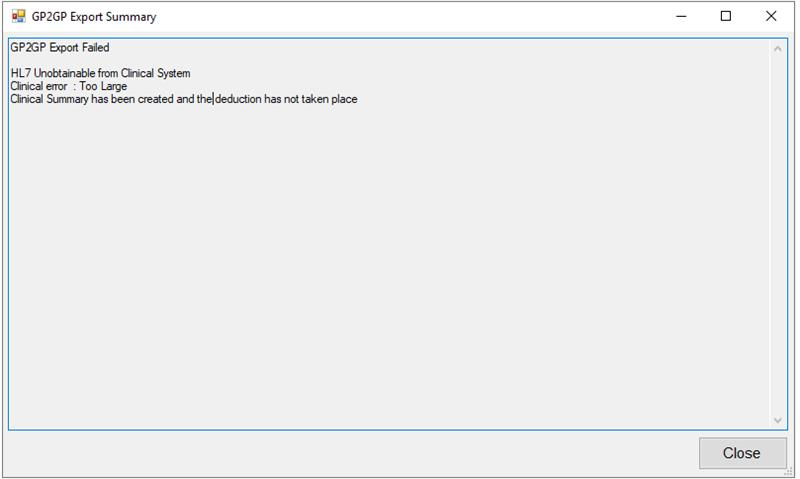
Changed the message on screen and report for a GP2GP export, when an HL7 file is greater than 5mb
Why have we done this?
NSS requested clearer messaging
How will you benefit?
The result of the GP2GP export will be clearer to the user
Details of the change
Report message if file size too large:

Screen message if file size too large:
Remove Vintasoft tiles on session_end event
What have we done?
(Internal Reference D10-11407)
Amended the DM10 web application so that it removes Vintasoft session storage and the end of a session. This will keep the server’s temporary Vintasoft document cache to a minimum size.
Why have we done this?
Vintasoft creates tiles on the ec2 instance, which is stored up over time and causes the machine to crash due to storage space
How will you benefit?
Performance improvements
Details of the change
Amended the DM10 web application so that it removes Vintasoft session storage and the end of a session
SNOMED file – Provide option for Full or Delta updates
What have we done?
(Internal Reference D10-15433)
Changed the SNOMED update process for clinical codes, so that it can run as a Full Refresh or Deltas.
Why have we done this?
Delta updates are applied currently, based on TRUD updates from NHS England. The ability to run a Full Refresh will give opportunity to rectify any data mismatch
How will you benefit?
There will be no change to end users
Details of the change
TRUD updates will be applied as Delta updates, as now. The option to run a Full Refresh has been added, in case required.
Increase Run Frequency of Clinical Interaction Tool
What have we done?
(Internal Reference D10-15154)
The current Clinical Interaction tool runs every 6 hours. The frequency will change to run every 3 hours (expected schedule change on Tuesday 24th Feb), and monitored for success, before frequency is reduced to run every 1 hour (expected schedule change on Tuesday 2nd March),
Why have we done this?
To provide more timely updates from Docman GP into EMIS Clinical System
How will you benefit?
End users will see changes in EMIS more quickly
Details of the change
Schedule change only.
Scotland Defect 1485: Docman 10 - GP2GP - Docman 10 GP2GP Patient export missing the "Item ID" in XML export file
What have we done?
(Internal Reference D10-15646)
Amended the GP2GP process to include Item ID
Why have we done this?
Docman 10 GP2GP Patient export was missing the Item ID needed for Scotland’s E-Link step in the GP2GP process
How will you benefit?
Scotland GP2GP will include Item ID
Details of the change
Web API change to update the GP2GP process
